
Artificial intelligence is no longer a futuristic concept. In 2027, AI tools have become part of everyday work, learning, and content creation. Students use AI to study more efficiently, marketers build campaigns faster, businesses automate workflows, and creators produce images, videos, and voiceovers in minutes.
With hundreds of AI platforms available, choosing the right one can be challenging. Some tools specialize in writing and research, while others focus on coding, image generation, video creation, productivity, or automation.
The good news is that many of the best AI tools in 2027 offer free plans alongside premium options, making it easy to get started before investing in advanced features.
In this guide, we’ll cover the 25 best AI tools you should try in 2027, including writing assistants, image generators, video tools, coding assistants, productivity apps, and research platforms.
Whether you’re a student, blogger, YouTuber, developer, marketer, or business owner, you’ll find tools that fit your workflow and goals.
My Experience Testing AI Tools
Over the past year, I’ve tested dozens of AI platforms for writing, image generation, research, coding, video creation, and productivity. Some excel in specific areas, while others serve as versatile all-in-one assistants.
The recommendations in this guide are based on practical experience, ease of use, strengths, limitations, and overall value—not marketing claims.
Quick Comparison Table
Here is a quick overview of some of the best AI tools in 2027 and what they are best used for.
| Tool | Category | Free Plan | Best For |
|---|---|---|---|
| ChatGPT | Writing & Productivity | Yes | General AI assistant |
| Claude AI | Writing & Research | Yes | Long-form writing |
| Gemini | Productivity | Yes | Google Workspace users |
| Midjourney | Image Generation | No | Artistic and creative images |
| Veo 3 | Video Generation | Limited | AI video creation |
| Perplexity AI | Search & Research | Yes | Research and fact-checking |
| Notion AI | Productivity | Limited | Notes, documents, and teams |
| ElevenLabs | Voice Generation | Yes | AI voiceovers |
| Canva AI | Design | Yes | Social media graphics |
| GitHub Copilot | Coding | Limited | Developers and programmers |
ChatGPT remains one of the most versatile AI assistants available. However, tools like Claude AI, Midjourney, Veo 3, and ElevenLabs stand out in their respective categories. The right choice ultimately depends on your needs, workflow, and budget.

Best AI Writing Tools
AI writing tools have become indispensable for bloggers, marketers, students, professionals, and businesses. They help with content creation, emails, research, summaries, and editing.
ChatGPT
Overview
Developed by OpenAI, ChatGPT remains one of the most versatile AI assistants in 2027. Beyond writing, it supports coding, research, image generation, file analysis, brainstorming, and productivity tasks.
Key Features
- GPT-5 intelligence
- Real-time search
- Image generation
- File analysis
- Voice mode
- Custom GPTs
Pros
- Excellent writing quality
- Highly versatile
- Strong coding support
- Large ecosystem
Cons
- Premium features require a subscription
- Some responses still need fact-checking
Pricing
- Free plan available
- ChatGPT Plus: $20/month
Best For
Bloggers, marketers, students, developers, professionals, and businesses.
Claude AI
Overview
Anthropic’s Claude AI is known for its natural writing style, Capable reasoning, and ability to process large documents. It’s particularly effective for long-form writing, research, and document analysis.
Key Features
- Large context window
- Natural writing style
- Reliable reasoning
- PDF and document analysis
Pros
- Excellent for long-form content
- Effective research capabilities
- Clean interface
Cons
- Limited image generation
- Smaller ecosystem than ChatGPT
Pricing
- Free plan available
- Claude Pro starts around $20/month
Best For
Writers, researchers, editors, students, and content creators.
Gemini
Overview
Google Gemini is an excellent choice for users already working inside the Google ecosystem. Its integration with Gmail, Docs, Sheets, and Drive makes it one of the strongest AI productivity tools available.
Key Features
- Google Workspace integration
- Multimodal capabilities
- Real-time information
- Writing and research assistance
Pros
- Ideal for Google users
- Impressive research capabilities
- Excellent productivity features
Cons
- Writing style can sometimes feel less natural
- Advanced features are closely tied to Google services
Pricing
- Free plan available
- Premium plans available
Best For
Professionals, teams, and Google Workspace users.
Jasper AI
Overview
Jasper AI is built primarily for marketers, agencies, and businesses that need scalable content creation. It excels at producing blog posts, ad copy, landing pages, and brand-focused content.
Key Features
- SEO content generation
- Brand voice customization
- Marketing templates
- Team collaboration
Pros
- Excellent for marketing content
- Strong brand consistency
- Business-oriented workflows
Cons
- More expensive than many competitors
- Less versatile for everyday use
Pricing
- Paid plans start around $39/month
Best For
Agencies, businesses, marketers, and content teams.
Grammarly
Overview
Grammarly has evolved from a grammar checker into a complete writing assistant. It improves grammar, clarity, tone, and readability across emails, documents, and online platforms.
Key Features
- Grammar and spelling correction
- Tone adjustments
- AI rewriting
- Email assistance
Pros
- Easy to use
- Improves readability
- Works across multiple platforms
Cons
- Limited content generation compared with ChatGPT and Claude
- Premium features require a paid plan
Pricing
- Free plan available
- Premium plans available
Best For
Students, professionals, writers, editors, and business users.
Summary
For most users, ChatGPT and Claude AI remain the strongest writing tools in 2027. ChatGPT offers the best all-around experience, while Claude AI excels in long-form writing and document-heavy workflows.

Best AI Image Generators
AI image generators have changed how creators, designers, marketers, and businesses produce visuals. From realistic portraits and product mockups to logos, posters, and social media graphics, these tools can turn simple prompts into high-quality images.
Midjourney
Overview
Midjourney is one of the best AI image generators for artistic, cinematic, and visually striking images. It is popular among designers, digital artists, and creators who want premium-quality visuals.
Key Features
- Highly detailed artwork
- Cinematic and realistic styles
- Strong prompt interpretation
- Large creative community
Pros
- Outstanding image quality
- Unique artistic style
- Consistent visual outputs
Cons
- No free plan
- Beginners may need time to learn prompting
Pricing
- Paid plans available
Best For
Artists, designers, creators, and brands that need premium visuals.
Leonardo AI
Overview
Leonardo AI combines strong image generation with customization features, making it useful for marketers, game developers, and digital creators.
Key Features
- Realistic image generation
- Character consistency
- AI canvas editing
- Multiple visual styles
Pros
- User-friendly interface
- Free plan available
- Excellent image quality
Cons
- Free plans have daily limits
- Advanced features require a paid plan
Pricing
- Free and paid plans available
Best For
Content creators, marketers, designers, and game developers.
Ideogram
Overview
Ideogram is known for generating images with accurate text, making it useful for posters, logos, social media graphics, and branding materials.
Key Features
- Strong text rendering
- Logo creation
- Typography support
- High-resolution outputs
Pros
- Excellent for text-based visuals
- Easy to use
- Free plan available
Cons
- Limited advanced editing features
- Less artistic than Midjourney
Pricing
- Free and premium plans available
Best For
Branding, logos, posters, and graphic design.
Flux AI
Overview
Flux AI has gained attention for realistic image quality and strong prompt accuracy. It is especially useful for photorealistic visuals and creative projects.
Key Features
- Photorealistic outputs
- Strong prompt adherence
- Fast image generation
- Multiple styles
Pros
- Realistic image quality
- Simple interface
- Good creative flexibility
Cons
- Fewer integrations than larger platforms
- Some features are still developing
Pricing
- Free and paid options available
Best For
Photorealistic images, creative projects, and marketing visuals.
ChatGPT Image Generator
Overview
ChatGPT’s image generator combines image creation with conversational prompting. Users can describe, refine, and adjust images naturally without switching between different tools.
Key Features
- Conversational prompt editing
- Realistic and artistic image creation
- Image modification support
- Integrated with ChatGPT
Pros
- Easy to use
- Strong prompt understanding
- Part of a complete AI ecosystem
Cons
- Usage limits may apply
- Not as art-focused as Midjourney
Pricing
- Free access with limitations
- More features available with ChatGPT Plus
Best For
Bloggers, marketers, content creators, businesses, and everyday users.
Summary
Midjourney is still the top choice for artistic AI images, while Leonardo AI and Flux AI are excellent for realistic visuals. For users already using ChatGPT, the built-in image generator is one of the most convenient options.
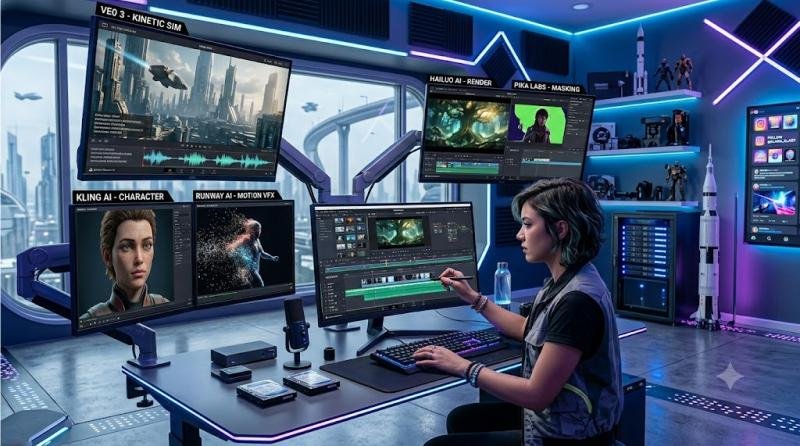
Best AI Video Generators
AI video generators make it possible to create cinematic clips, animations, social media videos, and short films from text prompts or images. These tools can save creators, marketers, and filmmakers a lot of production time.
Veo 3
Overview
Developed by Google, Veo 3 is one of the most advanced AI video generators in 2027. It is known for realistic motion, cinematic visuals, and strong prompt understanding.
Key Features
- Text-to-video generation
- Realistic motion and effects
- High-quality visuals
- Strong prompt interpretation
Pros
- Excellent video quality
- Cinematic results
- Strong realism
Cons
- Limited availability
- Premium access may be required for heavy use
Best For
Filmmakers, YouTubers, advertisers, and professional creators.
Kling AI
Overview
Kling AI is popular for producing realistic videos with smooth motion and strong visual consistency. It is especially useful for short-form video content.
Key Features
- Text-to-video generation
- Image-to-video capabilities
- Realistic motion
- High-resolution outputs
Pros
- Excellent visual quality
- Good free plan
- Smooth animations
Cons
- Rendering can take time
- Advanced features may require paid plans
Best For
YouTubers, marketers, social media creators, and short-form video producers.
Runway AI
Overview
Runway AI is a powerful AI video generation and editing platform. It combines creative video tools with professional editing features, making it popular among filmmakers and video editors.
Key Features
- Text-to-video generation
- Video editing tools
- Background removal
- Motion tracking
Pros
- Professional-grade editing tools
- User-friendly interface
- Strong creative control
Cons
- Premium plans can be expensive
- Beginners may need time to learn the platform
Best For
Video editors, filmmakers, creative professionals, and agencies.
Hailuo AI
Overview
Hailuo AI is gaining popularity for cinematic AI-generated videos with natural motion and storytelling potential.
Key Features
- Text-to-video creation
- Cinematic effects
- Realistic movement
- High-quality rendering
Pros
- Impressive visual quality
- Good for storytelling
- Easy to use
Cons
- Smaller ecosystem
- Availability may vary by region
Best For
Storytelling videos, social media content, and creative projects.
Pika Labs
Overview
Pika Labs focuses on fast and engaging AI video generation. It is especially useful for creators making YouTube Shorts, TikTok videos, and Instagram Reels.
Key Features
- Text-to-video generation
- Animation effects
- Easy prompt editing
- Quick rendering
Pros
- Beginner-friendly
- Fast video creation
- Good for short-form content
Cons
- Less advanced than Veo 3
- Limited professional editing features
Best For
Influencers, content creators, marketers, and short-form video producers.
Summary
Veo 3 leads in video quality and realism, while Runway AI is better for professional editing. Kling AI and Pika Labs are strong choices for short-form creators who need fast, engaging videos.
Best AI Voice Tools
AI voice tools are now widely used for YouTube videos, podcasts, audiobooks, ads, training videos, and business presentations. They can generate realistic voiceovers in multiple languages without expensive recording equipment.
ElevenLabs
Overview
ElevenLabs is one of the most popular AI voice generators in 2027. It is known for realistic voices, multilingual support, and high-quality text-to-speech generation.
Key Features
- Human-like AI voices
- Voice cloning
- Multilingual support
- Text-to-speech conversion
Pros
- Excellent voice quality
- Wide range of voices
- Supports many languages
Cons
- Premium features require a subscription
- Voice cloning has usage restrictions
Pricing
- Free and paid plans available
Best For
YouTubers, podcasters, audiobook creators, educators, and businesses.
Murf
Overview
Murf AI is a professional voice generation platform designed for business videos, presentations, training content, and commercial voiceovers.
Key Features
- Text-to-speech conversion
- Voice customization
- Commercial voiceovers
- Multiple languages and accents
Pros
- Easy to use
- Professional-quality voices
- Great for presentations
Cons
- Free plan is limited
- Premium plans can be expensive
Pricing
- Free trial and paid plans available
Best For
Businesses, educators, corporate trainers, and presentation creators.
PlayHT
Overview
PlayHT is a powerful AI voice platform with realistic speech synthesis, voice cloning, and API access for developers and businesses.
Key Features
- High-quality text-to-speech
- Voice cloning
- Multiple languages
- API integration
Pros
- Natural-sounding voices
- Large voice library
- Strong developer tools
Cons
- Advanced features require paid plans
- Beginners may need time to explore all features
Pricing
- Free and premium plans available
Best For
Developers, content creators, businesses, and audio production teams.
Summary
ElevenLabs is the best overall AI voice generator for most creators because of its realistic voice quality. Murf is better for corporate content, while PlayHT is a strong option for developers and businesses that need API access.
Best AI Productivity Tools
AI productivity tools help individuals and teams save time, organize information, automate tasks, and manage work more efficiently.
Notion AI
Overview
Notion AI brings writing, note-taking, project management, and knowledge organization into one workspace. It helps users summarize documents, generate ideas, organize tasks, and manage projects.
Key Features
- AI writing assistance
- Document summarization
- Task and project management
- Knowledge base organization
Pros
- Clean and intuitive interface
- Great collaboration features
- Excellent for organizing information
Cons
- Advanced features require a subscription
- It can take time to set up properly
Pricing
- Free and paid plans available
Best For
Students, teams, content creators, startups, and businesses.
Zapier
Overview
Zapier is one of the best no-code automation tools. It connects thousands of apps and allows users to automate repetitive workflows without writing code.
Key Features
- Workflow automation
- AI-powered actions
- Integration with thousands of apps
- No-code setup
Pros
- Saves time through automation
- Huge app ecosystem
- Easy to start
Cons
- Premium plans can become expensive
- Complex automations require learning
Pricing
- Free and premium plans available
Best For
Small businesses, marketers, freelancers, and operations teams.
Fireflies AI
Overview
Fireflies AI is an intelligent meeting assistant that records, transcribes, and summarizes meetings automatically. It works well for teams that attend frequent calls.
Key Features
- Meeting transcription
- AI summaries
- Searchable conversations
- Team collaboration
Pros
- Saves time on note-taking
- Useful meeting summaries
- Integrates with major platforms
Cons
- Free plan has limitations
- Accuracy depends on audio quality
Pricing
- Free and paid plans available
Best For
Remote teams, managers, sales teams, and business professionals.
Otter AI
Overview
Otter AI is a popular AI transcription and note-taking tool. It helps users capture meetings, lectures, interviews, and conversations in real time.
Key Features
- Real-time transcription
- Meeting summaries
- Speaker identification
- Collaboration tools
Pros
- Easy to use
- Reliable transcriptions
- Good for teams and students
Cons
- Free plan has monthly limits
- Advanced features require premium plans
Pricing
- Free and paid plans available
Best For
Students, journalists, professionals, teachers, and remote teams.
Summary
Notion AI is best for organizing information and projects, Zapier is ideal for workflow automation, and Fireflies AI and Otter AI are excellent for meeting notes and transcription.
Best AI Coding Tools
AI coding tools help developers write code faster, debug errors, understand complex projects, and improve productivity. They are useful for both beginners and experienced programmers.
GitHub Copilot
Overview
GitHub Copilot, developed by GitHub in collaboration with OpenAI, is one of the most widely used AI coding assistants. It provides intelligent code suggestions directly inside popular code editors.
Key Features
- Real-time code completion
- Support for multiple programming languages
- Code explanations and suggestions
- IDE integration
Pros
- Speeds up development
- Strong language support
- Works well with Visual Studio Code
Cons
- Paid subscription required for most users
- Generated code still needs review
Pricing
- Free for eligible users
- Paid plans available
Best For
Professional developers, software engineers, students, and coding teams.
Cursor AI
Overview
Cursor AI is an AI-first code editor built on Visual Studio Code. It helps developers generate, edit, refactor, and debug code using natural language commands.
Key Features
- AI-powered code editor
- Natural language coding
- Code refactoring
- Debugging assistance
Pros
- Excellent AI coding workflow
- Strong code understanding
- Improves developer productivity
Cons
- Advanced features require a subscription
- New users may need time to adjust
Pricing
- Free and premium plans available
Best For
Developers, startups, AI builders, and software teams.
Windsurf
Overview
Windsurf is an emerging AI coding platform designed to help developers write, understand, and manage code more efficiently. It focuses on context-aware coding and multi-file project understanding.
Key Features
- AI code generation
- Context-aware suggestions
- Project understanding
- Multi-file editing support
Pros
- Modern interface
- Strong code understanding
- Good collaboration features
Cons
- Smaller ecosystem than GitHub Copilot
- Still evolving quickly
Pricing
- Free and paid plans available
Best For
Developers who want an AI-native coding experience.
Summary
GitHub Copilot remains the industry standard for AI-assisted coding, while Cursor AI is gaining popularity for its AI-first development workflow. Windsurf is also worth watching for developers who want smarter project-level code assistance.
Best AI Search Tools
AI search tools are changing how people find information online. Instead of opening many web pages, users can get direct answers, summaries, and source references in one place.
Perplexity AI
Overview
Perplexity AI is one of the most popular AI-powered search engines. It combines conversational AI with real-time web search and source citations, making it useful for research and fact-checking.
Key Features
- Real-time web search
- Source citations
- Conversational interface
- Follow-up questions
- Deep research support
Pros
- Excellent for research
- Provides source references
- Fast and easy to use
Cons
- Limited creative capabilities
- Premium features require a subscription
Pricing
- Free and Pro plans available
Best For
Researchers, students, journalists, professionals, and fact-checkers.
ChatGPT Search
Overview
ChatGPT Search combines conversational AI with web search, allowing users to ask questions naturally and receive up-to-date answers inside the ChatGPT interface.
Key Features
- Conversational search experience
- Real-time information
- Context-aware follow-up questions
- Integrated with ChatGPT
Pros
- Easy to use
- Combines search with writing and brainstorming
- Useful for everyday research
Cons
- Source details may vary depending on the query
- Advanced access may require a paid plan
Pricing
- Free and paid plans available
Best For
Everyday users, content creators, professionals, and anyone who wants an all-in-one AI assistant.
Summary
Perplexity AI is better for research-heavy tasks and source verification, while ChatGPT Search is more versatile because it combines search, writing, brainstorming, and productivity features.
Which AI Tool Is Best?
There is no single best AI tool for everyone. The right choice depends on your work, goals, and budget. Some tools are better for writing, while others are stronger for research, video creation, coding, design, or automation.
For Students
Recommended Tools: ChatGPT + Perplexity AI
Students can use ChatGPT for explanations, summaries, study notes, and problem-solving. Perplexity AI is useful for research because it provides answers with source references.
Best For
- Homework help
- Research
- Summarization
- Learning new topics
For Bloggers and Content Creators
Recommended Tools: ChatGPT + Claude AI + Grammarly
This combination creates a strong writing workflow. ChatGPT helps with ideas, outlines, and drafts. Claude AI is excellent for long-form content, while Grammarly improves clarity, grammar, and readability.
Best For
- Blog posts
- SEO content
- Editing and proofreading
- Content planning
For YouTubers
Recommended Tools: Veo 3 + ElevenLabs + Canva AI
YouTubers can use Veo 3 for AI video creation, ElevenLabs for realistic voiceovers, and Canva AI for thumbnails, graphics, and social media posts.
Best For
- YouTube Shorts
- Video production
- Voiceovers
- Thumbnail design
For Businesses
Recommended Tools: Gemini + Notion AI + Zapier
Businesses can use Gemini for Google Workspace productivity, Notion AI for knowledge management, and Zapier for workflow automation.
Best For
- Team productivity
- Document management
- Workflow automation
- Business operations
For Developers
Recommended Tools: Cursor AI + GitHub Copilot
Developers can use Cursor AI for AI-assisted coding and GitHub Copilot for intelligent code completion, debugging, and faster development.
Best For
- Code generation
- Debugging
- Software development
- Learning programming
Bottom Line
ChatGPT is the best overall AI assistant for most users because it handles writing, research, coding, image generation, and productivity tasks in one place. However, specialized tools often deliver better results for specific tasks. In many cases, the best workflow is to combine two or three AI tools instead of relying on only one.
Free vs Paid AI Tools
One of the biggest advantages of modern AI software is that many platforms offer free plans. Tools like ChatGPT, Claude AI, Gemini, Perplexity AI, Grammarly, Canva AI, and ElevenLabs allow users to test core features without paying.
For students, casual users, and beginners, free AI tools are often enough for everyday tasks such as writing, research, summarization, editing, and basic content creation.
However, paid plans become worthwhile when you use AI regularly for work, business, or content production. Premium plans usually offer faster responses, higher usage limits, advanced models, priority access, file uploads, image generation, voice features, automation, and team collaboration tools.
For example, bloggers and marketers may benefit from ChatGPT Plus or Claude Pro, while businesses can save hours each week with tools like Notion AI and Zapier. If an AI tool helps you save time, improve output quality, or increase revenue, upgrading can be a smart investment.
Best Free AI Tools in 2027
Many AI platforms offer useful free plans, making it easier for beginners to explore AI without paying upfront.
| Tool | Free Plan | Best For |
| ChatGPT | Yes | Writing and productivity |
| Claude AI | Yes | Long-form writing |
| Gemini | Yes | Google Workspace users |
| Perplexity AI | Yes | Research and fact-checking |
| Canva AI | Yes | Design and graphics |
| ElevenLabs | Yes | Voice generation |
| Leonardo AI | Yes | Image generation |
| Grammarly | Yes | Editing and grammar |
For most beginners, free plans are enough to start learning, experimenting, and building a basic AI workflow.
Frequently Asked Questions
What is the best AI tool in 2027?
ChatGPT is one of the best AI tools in 2027 because of its versatility. It supports writing, coding, research, image generation, voice features, file analysis, and productivity tasks, making it useful for students, professionals, businesses, and creators.
Which AI tool is free?
Many popular AI tools offer free plans, including ChatGPT, Claude AI, Gemini, Perplexity AI, Grammarly, Canva AI, and ElevenLabs. Free plans are useful for everyday tasks, while paid plans unlock advanced features and higher usage limits.
Which AI is better than ChatGPT?
No single AI tool is better than ChatGPT in every category. Claude AI is excellent for long-form writing and document analysis, Perplexity AI is strong for research, and Midjourney is better for artistic image generation. The best choice depends on your specific use case.
Which AI tool is best for students?
ChatGPT and Perplexity AI are among the best AI tools for students. ChatGPT helps with explanations, summaries, and study support, while Perplexity AI is useful for research and fact-checking because it provides source references.
Which AI image generator is best?
Midjourney is widely regarded as one of the best AI image generators in 2027 because of its artistic quality and realistic outputs. Leonardo AI, Flux AI, Ideogram, and ChatGPT Image Generator are also strong alternatives.
Which AI video generator is best?
Veo 3 is one of the best AI video generators in 2027 because of its realistic motion, cinematic quality, and advanced text-to-video capabilities. Runway AI, Kling AI, Hailuo AI, and Pika Labs are also popular among creators.
Are AI tools worth paying for?
Yes, paid AI tools are worth it for professionals, creators, businesses, and students who use AI frequently. Premium plans provide better models, higher limits, faster performance, and advanced features that can save time and improve productivity.
AI Trends to Watch in 2027
Artificial intelligence continues to evolve quickly. These trends are shaping how people use AI tools for work, learning, and creativity.
AI Agents
AI systems are becoming more capable of completing tasks with less manual input, moving beyond simple prompt-and-response workflows.
Multimodal AI
Modern AI tools can understand text, images, audio, and video together, creating more natural and flexible interactions.
AI Video Generation
Video tools such as Veo 3, Kling AI, and Runway AI are making cinematic content creation more accessible to creators and businesses.
Voice AI
Platforms like ElevenLabs are pushing voice synthesis closer to natural human speech, making AI voiceovers more useful for content production.
AI Automation
Businesses are increasingly using AI to automate workflows, customer support, reports, content operations, and repetitive tasks.
Personalized AI Assistants
AI assistants are becoming more context-aware and better integrated into everyday workflows, helping users manage information and complete tasks faster.
These trends suggest that AI will continue reshaping how people work, learn, create, and communicate over the coming years.
Conclusion
AI tools are changing how people work, learn, create, and communicate. The right tool can help you write faster, research better, design visuals, create videos, generate voiceovers, automate workflows, and build software more efficiently.
My Top AI Tools in 2027
After testing dozens of AI platforms, these are the tools I find most useful for everyday work and content creation.
🏆 Best Overall AI Assistant: ChatGPT
ChatGPT remains my top recommendation because it combines writing, research, coding, image generation, voice features, and productivity tools in one ecosystem.
✍️ Best for Writing: Claude AI
Claude AI excels at long-form writing, editing, and document analysis. Its natural writing style makes it especially useful for content creators and researchers.
🎨 Best AI Image Generator: Midjourney
Midjourney consistently delivers some of the most impressive artistic and cinematic images available today.
🔍 Best Research Tool: Perplexity AI
Perplexity AI stands out for fact-checking and source-based answers, making it an excellent companion for students and professionals.
🎥 Best AI Video Generator: Veo 3
Veo 3 produces realistic motion and cinematic videos, making it one of the most exciting AI video tools in 2027.
🎙️ Best AI Voice Tool: ElevenLabs
ElevenLabs offers remarkably realistic voice generation and remains my preferred choice for voiceovers and narration.
💻 Best Coding Assistant: GitHub Copilot
GitHub Copilot helps developers write code faster and remains one of the most widely adopted AI coding assistants.
Final Thoughts
The best AI tools in 2027 depend on your goals. A student may need ChatGPT and Perplexity AI, while a YouTuber may prefer Veo 3, ElevenLabs, and Canva AI. A business may get better results from Gemini, Notion AI, and Zapier.
The smartest approach is to choose tools that match your workflow and combine them when needed. Whether you are writing, designing, coding, researching, or creating videos, AI can help you work faster, smarter, and more creatively.